


Welcome, dear readers!
Today, we’re exploring Telegram from an OSINT perspective. More specifically, how to search for information, people, and connections within the platform and, more importantly, how to actually find them.
Telegram can be viewed in many ways. However, it’s hard to argue with the fact that it has firmly established its own niche and is widely regarded as a convenient tool. It is also equally obvious that a massive amount of information circulates within Telegram. And wherever information exists, OSINT investigators tend to follow. In the background, you will often encounter discussions about free software, anonymity, and other somewhat mythologized concepts. In most cases, the best approach is simply to agree and move on rather than engage in endless debates.
This article will not focus on Telegram’s anonymity or security aspects. First, because that is not the purpose of this text. Second, because the topic has already been discussed, analyzed, and debated extensively across articles, videos, and talks, and it is probably long past the point where anything truly new can be added at a general level.
However, there are still several aspects worth examining through an OSINT lens. In fact, it makes sense to cover them at the very beginning, since they represent the basic mechanics of how the platform works from an investigative perspective.
Phone Number
If you register your phone number in Telegram, that fact is publicly discoverable by default. To check whether a specific number is associated with a Telegram account, you can simply save the number, for example in your Saved Messages, and then tap on it. If the number is registered in Telegram, you will see an option such as “View Profile”.
This method will not work if the user has disabled the ability to be found by phone number in their privacy settings. However, in practice, relatively few users change this setting, and the check itself takes very little time. For this reason, it is generally recommended to verify it whenever possible.
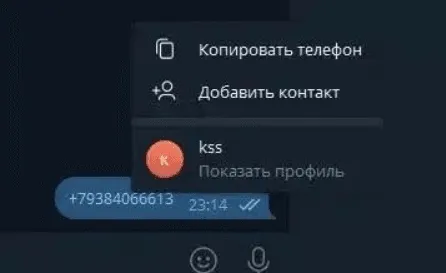
Unfortunately, this does not work in the opposite direction either. In other words, knowing a Telegram account does not allow you to view the associated phone number. The only exception is if the user has made their number visible to everyone in their privacy settings. However, accounts will be discussed separately.
Telegram ID
Usernames, bot names, channel names, and chat titles in Telegram are not permanent and can be changed as many times as needed. Moreover, phone numbers can also be changed multiple times. However, in order to keep track of who is who, Telegram uses identifiers known as Telegram IDs.
A Telegram ID is a unique numeric identifier assigned to a user at the moment of registration, and it cannot be changed. The most common way to find someone’s ID is by using dedicated bots designed for this purpose. For example, one of the most widely used ones is:
https://t.me/telesint_channel.
We send the bot a username or a channel or chat name, and in response we receive the corresponding ID. This is of course quite simple, but if you need to work with Telegram identifiers more often than just once, constantly switching to a bot becomes inconvenient.
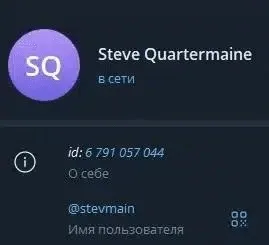
Moreover, Telegram itself does not hide these IDs from the system. They are simply not shown by default because they are not needed by most users most of the time.
This can be easily changed. In the desktop application, go to Settings and then open Advanced settings. At the very bottom, you will find Experimental settings. There, locate and enable “Show Peer IDs in Profile”. After that, IDs will appear in the profiles of channels, chats, bots, and users. From there, they can be easily copied when needed.

Sometimes you may need to find out the creation date of a specific account. The simplest way to do this is to send the bot https://t.me/creationdatebot the ID of the target user.
Nickname
Telegram users have two types of names, and both are optional. The first is the “First name / Last name” field. This is what you typically see in contact lists and chats. It can contain anything, and there is no requirement for uniqueness. As a result, it usually carries little to no reliable identifying value. There are exceptions, of course, such as cases where a real first and last name are used, but this is always context-dependent and should be assessed individually.
The second is the username, which starts with “@”. Although it is commonly referred to as a nickname, it effectively functions as a unique identifier within Telegram. No two users can have the same username, although it can be changed at any time.
This uniqueness allows us to quickly verify whether a username exists. You simply add “@” in front of the username, save it in Telegram Saved Messages, for example, and try to open it.
In addition, you can format the username as a link in the form https://t.me/USERNAME and open it in a browser. If it redirects you to the main Telegram website page, it means the user does not exist. If the user exists, it will open their profile and prompt you to continue in the app or web version.
Links in this format are not limited to user profiles. Channels, chats, and bots also use the same structure. As a result, the same method can be applied to them as well.
In addition, these links are indexed by Google, which means they can also be found using the site: search operator, for example: site: site:t.me dstoun
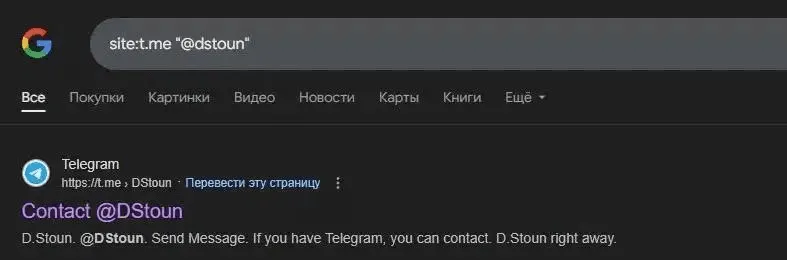
The same approach can also be used in reverse. If we know a Telegram account and see that it uses a fairly unique username, we can try to search for other accounts across social networks or other platforms. For a quick overview, Google can be used. For a more structured and in-depth search, tools such as https://whatsmyname.app/ can be helpful.
In general, username-based search is a topic on its own. There is a separate article covering the nuances of this process and offering different approaches and methods. If you haven’t read it yet, it is worth checking out.
Among the suggested tools, I would add (or even replace them with)
https://github.com/soxoj/maigret. This is a case where the implementation is genuinely well done. First, it is capable of checking a large number of sources. Second, it generates a convenient report with the results. At the same time, it collects a significant amount of useful information from found accounts, including profile photos.
Telegram User De-anonymization
All of the above is, in most cases, used to determine the real identity of a person behind a Telegram account. This is a very common task in OSINT investigations. The main issue is that there is no universal method for de-anonymizing Telegram users. Likewise, there is no fixed algorithm that guarantees results.
Moreover, if a person intentionally tries to stay hidden and has at least a basic understanding of operational security, the chances of successfully identifying them are, to put it mildly, quite low. However, this is not a reason not to try.
Let’s now look at how this can be approached in practice.
Telegram Bots
The first thing worth trying, simply because it is fast, is checking information through bots that aggregate data from leaks and compromised databases. There are many such bots, but the main issue is that they tend to disappear over time, meaning they are periodically removed by Telegram. However, they usually reappear later under new links.
In my experience, some of the more effective ones, meaning those with the largest databases, include OsintKit, Глаз Бога, and Horus, which tend to provide decent results at a relatively reasonable cost. Another well-known service is Himera Search.
It generally performs well, but in my opinion, the pricing is not justified. Overall, it comes down to personal preference, and everyone chooses the tools they find most convenient.
We check information in such bots because there is a possibility that they may reveal a person’s phone number or other data based on an ID or username. I think this is fairly straightforward.
Profile analysis
The next step, even if it seems obvious, is to carefully examine the account. More precisely, the content it contains. This means not just looking at it quickly, but assessing how unique the data published by the user is and how useful it may be for our objectives.
In some cases, before deciding how to work with this data, it is also important to understand how reliable it is. This is not always an easy task because there is a possibility that we are dealing with Sock Puppets.
Sock Puppets — are fake accounts created to protect
identity. Хor those who missed it, there is an article and video on the topic:
https://hacker-basement.com/2023/08/01/feikovie-akaunti-v-osint-sock-pupets/
When we come across a profile photo, full name, username, or any other details in an account description, the first step is to verify each piece of information individually.
How do we approach this? If we have additional context or external sources that can be cross-referenced with the account, this is the most effective option and should be used first. If no such context is available, each element should be analyzed on its own and then compared against the rest. We repeat this process until we either find reliable matches or conclude that the information is being used in a misleading way.
We come across a profile picture showing a person, but we cannot yet confirm whether it actually belongs to the person of interest. The next step is to take this image and analyze it. We try to determine who appears in the photo or where else it has been used online. If a donor account was used to build a fake profile, there is a possibility of tracing it back to its original source. If the image is authentic, this approach can also help us collect additional information about the individual.
Additionally, we also pay attention to what else is visible in the photo besides the person. This can help assess its credibility or provide extra context. For example, if we know that the person of interest lives in Paris and the background of the photo also shows Paris, this supports the assumption that the image is likely authentic.
We apply the same approach to any other information in the account. We examine it, look for matches, analyze it, and compare it with other available data. Based on this, we decide whether it is relevant for our purposes or not.
User activity
Analyzing profile information and data from bots does not always lead to the results we need. In addition, the task may be more specific than basic data collection. For this reason, it can be useful to examine the groups and chats the user participates in. This often provides additional context, as people tend to engage in thematic communities.
For example, if a person is active in a city-related chat, it is reasonable to assume they may have some connection to that place. Interest-based groups can also reveal hobbies or personal preferences. This information can be useful for understanding the person of interest, especially if future interaction is planned. Shared communities and awareness of interests can significantly improve the ability to establish contact and maintain communication.
It is also important not only to identify the groups an account belongs to, but also to analyze the content the user posts there. This can be valuable, as useful information may be contained in their messages. There is no need to manually scroll through entire conversations, since most chats allow you to search and filter all messages from a specific user.
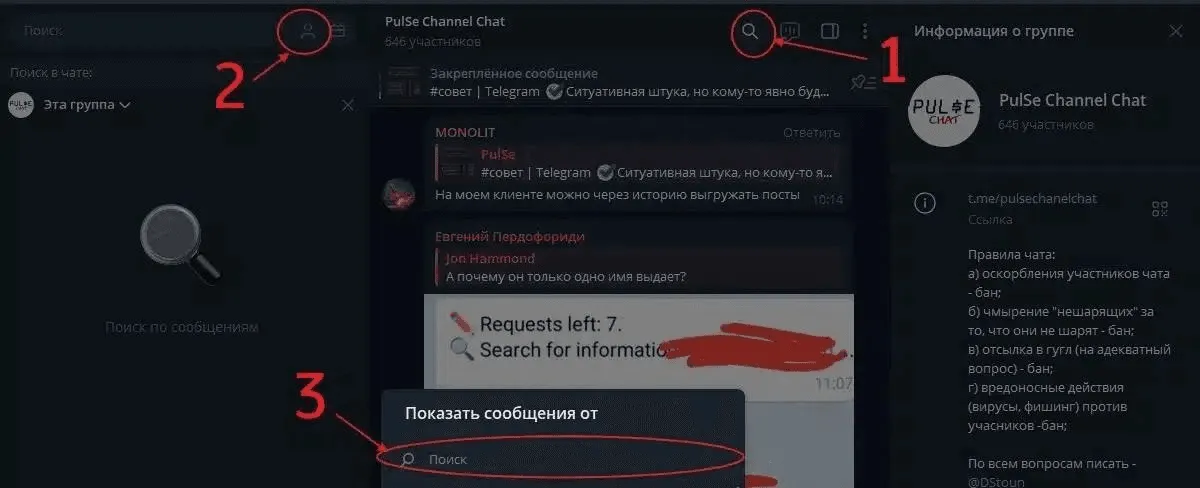
The main question in such a situation is how to identify the groups and chats a user is a member of. This typically has to be done using third-party resources. In addition, if higher-quality results are required, it may also involve using paid tools or services.
Here, once again, I’ll suggest a few options, and everyone can choose the one that suits them best:
► https://www.telegramdb.org - There is a website with an integrated bot. You can use either the bot directly or the website interface, but in both cases you will ultimately be redirected to the bot. The free version only allows searches for chats by keywords and user accounts by username. It can also find groups if a user is mentioned in the group description.
By making a small payment, you gain access to more advanced functionality, including searching for groups and chats a user is or has been part of. The service has a large and continuously expanding database of both users and communities.
One of the main advantages is that you can check for available results before paying, which lets you see whether the target account appears in any groups and how extensive the data coverage is.
► https://tgdev.io/tgscan — It is similar to the previous one, but it does not offer any free functionality at all, except for showing the number of results found. At the same time, it also has a fairly large database that is constantly being updated.
One useful feature is that it shows in the results when the user last posted in a group, which can help assess how active they are.
►https://t.me/where_a_person_wrote_bot (Their channel in case the bot is removed: https://t.me/where_a_person_wrote) — a free bot with a smaller database, but it still delivers reasonably good results. Among free tools, this one is quite reliable and can be used effectively.
Overall conclusions regarding investigating individuals: as mentioned earlier, there is no single formula for success. Instead, there is a systematic approach that may lead to results, although it is not guaranteed, as everything depends on the specific situation.
In short, this approach is based on collecting all available information by any means possible. We then analyze it, enrich it where we can, and cross-check the data. The process is driven by two main objectives: first, to verify or disprove the reliability of the information, and second, to establish whether the data actually belongs to a specific individual.
Telegram information gathering
With investigating individuals, I think we have more or less covered the basics. Now we move on to another, no less common direction, namely information gathering in Telegram. In my opinion, this process is more creative than investigating individuals. However, this does not change the fact that its effectiveness largely depends on a systematic approach.
What does this mean? It means that the first step is to clearly define what exactly we are looking for and in what form we expect to find it. In other words, we need to understand the end goal. Only then can we plan our actions in reverse. Based on a clear understanding of what we are searching for, we can determine what form that information might take and, consequently, which methods are best suited for finding it.
Telegram built-in search
It is worth taking a moment to discuss Telegram’s built-in search feature. There is a common belief that it is completely useless. However, this is not entirely accurate. While it is, to put it mildly, not well suited for broad searches, it works quite effectively when used within channels and groups you are already subscribed to.
In other words, if you have an idea of which channels may contain the information you are looking for, you can subscribe to them and use the internal search to look for specific keywords. This becomes even more effective if you use a separate account for this purpose and periodically clean it when starting a new topic. In such a setup, the built-in search can perform quite reliably.
However, it is important to note that Telegram’s internal search is only truly useful when you already know exactly which channels or groups you want to search within. In all other cases, its effectiveness is significantly limited.
Telegram channels and groups search
In most cases, searching for and collecting information in Telegram comes down to identifying the channels and groups where that information is actually published. This is quite logical, because once we know which group contains the information we need, finding it there is usually straightforward. The real question is how to find these channels and groups effectively, since there is more than one approach.
The method we choose mainly depends on how well we understand the topic we are working with. If we have no prior knowledge and need to build a basic understanding of the subject while getting familiar with relevant channels, the simplest option is often to start with Google. For example:
site:t.me/* ("osint" OR "intelligence")
In this context, we understand that all Telegram objects have links in the format t.me/ followed by some string of characters. Accordingly, we narrow our search to items that contain links of this type. In brackets, we can include any number of keywords or combinations of them. This is a broad search approach that helps us quickly get an overview of the topic.
Another less obvious aspect related to links concerns invitation links for groups, chats, or channels. These links are often unique, which makes it possible to track their public distribution simply by searching for an exact match. Such links usually look like this: https://t.me/+randomstringofcharacters. . Everything after the “+” can be taken in quotes and searched to find where it has been published.
The method described above can be loosely called a “search everywhere” approach. It works well in two situations: when we are looking for something quite unique, or when we are not yet sure what exactly we need and are exploring the topic broadly. In other, more intermediate cases, it is usually better to narrow the focus in some way.
Sometimes it also makes sense to search through channel names. In some cases, administrators choose names that clearly reflect or hint at the channel’s topic. This can be especially useful when looking for thematic groups. It can also help in situations where a private corporate chat has accidentally been left public. This happens more often than you might think.
site:t.me/* intitle:osint
For this purpose, as in the example above, we use the intitle: operator and include something that is likely to appear in the name of a channel or chat. This can be a keyword related to the topic, or, if we are looking for a company’s channel, it can be the company name or part of its name.
Telegram search engines
Another universal way to search in Telegram is by using search engines specifically designed for Telegram content.
In this context, I often see people recommend lyzem.com. I have to say I find this somewhat confusing, as I cannot tell whether I am using it incorrectly or whether those recommending it have never actually tested it in real-world scenarios. Despite multiple attempts, it has never produced any meaningful results in practice. Out of curiosity, I also checked the documentation, assuming I might be missing some functionality. It turns out that this tool does not index group content, only group descriptions.
In practice, lyzem.com is only useful for giving the impression of doing thorough research, or for showing that all possible options have been explored, even when no real results are expected. In any other case, there is little reason to use it, as it does not serve this purpose effectively. This brief note is meant to save time for anyone exploring the topic independently. Now we can move on to tools that actually work. At present, the most effective option is custom search engines built on Google CSE.
First of all, Telegago:
► https://cse.google.com/cse?&cx=006368593537057042503:efxu7xprihg

It searches through post content, as well as channel names and descriptions. It can also be used to find channels, users, bots, and chats. The next option has a slightly smaller coverage of sources, but still provides fairly solid search results.
► https://cse.google.com/cse?cx=004805129374225513871:p8lhfo0g3hg
It searches channel names and descriptions, as well as post content. It can also find user profiles and articles on telegra.ph.
If, like me, you prefer to run both search engines from a single place, this can be done using https://intelx.io/tools?tab=telegram .
Another useful alternative for searching is https://tgfind.org/ — it allows keyword-based searches within channel posts over a specified time period.
Telegram channel directories
Returning to the search for channels and groups, all the previously mentioned methods are relevant here as well, including Google, Telegram’s built-in search, and specialized search engines. However, another equally versatile and sometimes even more effective approach is using Telegram channel directories.
These directories often provide additional analytics, statistics, and other useful metadata about channels. In some cases, they may also show posts that have been deleted from a channel, which can be valuable for understanding its history and activity patterns.
These tools are primarily designed for advertising analytics and related use cases. However, as is often the case, marketing-oriented tools tend to work quite well for OSINT purposes as well, and Telegram is no exception.
There are quite a few such channel directories available. I am highlighting the ones that I personally find the most convenient to use.
► https://telemetr.io
The standard functionality here is searching by channel name. The name does not necessarily have to be entered exactly as it is.
Another useful tool, telemetr.io, is its post search feature. It allows searching by keywords or phrases. The results can be filtered by language, country, and category. However, the way categories are assigned in these directories is often quite inconsistent, so it is generally better to ignore this filter. In the free version, post search is limited to content from the last 7 days.
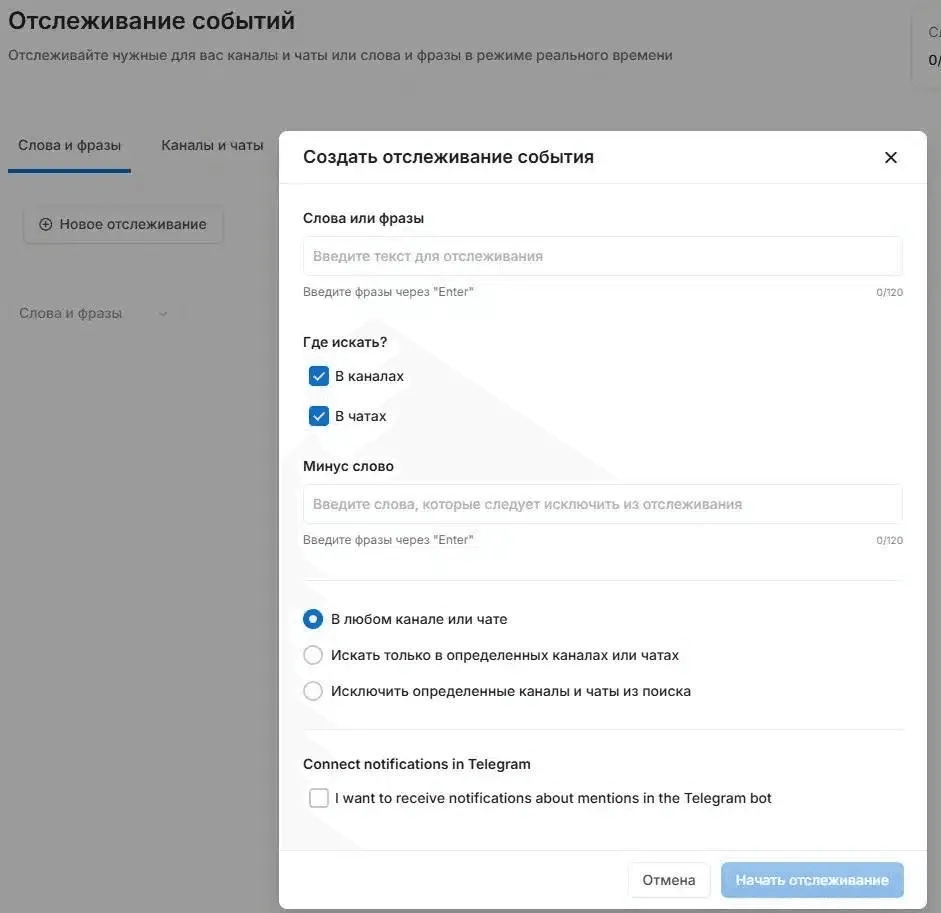
Another useful feature available here is mention tracking across channels and chats. It allows you to monitor both specific phrases and mentions of channels. The free version includes one active tracking query.
The setup is quite simple. You enter the phrase you want to track and, if needed, specify a phrase to exclude. Then you define the scope of monitoring. You can search across Telegram in general or limit it to specific channels. It is also possible to exclude certain channels from tracking.
Additionally, if needed, you can enable bot notifications, which can be quite convenient in some cases.
► https://uk.tgstat.com
This is also a channel directory, but with a few additional nuances. It offers a more advanced search for channels, including filters based on channel statistics such as subscriber count or channel age. It is also quite convenient that you can search not only by channel name, but also by description.
The statistics themselves are not necessarily of primary interest, but there are some useful features. For example, it is possible to view the history of username changes, as well as changes to a channel’s name and description. It also supports finding related channels, for instance when the same contact accounts are listed in their descriptions.
Post search is available as well, but using filters requires a paid subscription. Without filters, it returns a very large number of posts, which are often difficult to work with in practice.
Telegram Wayback Machine
Channel directories are useful and convenient, but they also have limitations. For example, a channel may be deleted, and even within directories, images are not always preserved. A post might also contain a video that gets removed later. In such cases, even if a deleted post can still be found in a directory, there is no way to access the original video. Or at least that may seem to be the case.
In situations like this, it is worth knowing that since 2022 the Wayback Machine has been archiving Telegram in the same way it archives regular websites. It does this by creating a separate collection for Telegram(https://web.archive.org/collection-search/telegram).
This is not the most convenient tool to use, but given the lack of alternatives, we have to work with what is available.
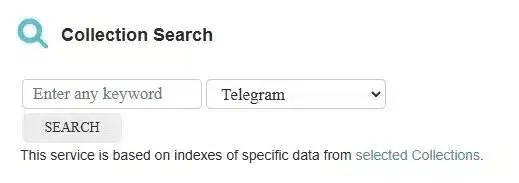
To start searching, you need to go to the main page, open the Collection Search section, enter a keyword or phrase, select the relevant collection, and run the search.
In most cases, this will return several thousand results, which can then be further filtered by date. Guidance on how to do this is usually provided on the results page. For each entry, you can also view the earliest and latest snapshots, if they are available. There is also typically a link to the original post.
Overall, if you need to find deleted content and no other options are available, it is worth checking the Internet Archive. It is a slow and somewhat tedious process, but as a last-resort tool, it can sometimes produce results.
Parsing Telegram channels and groups
Often, we do not need a specific piece of information from a single post. Instead, we may need to analyze an entire channel, a network of channels, or track an event that has been covered by a channel over a period of time. In other words, the goal is not a single post, but a broader set of content within a specific timeframe.
Manually browsing channels and reviewing content is possible, but it is not the most efficient approach from a productivity standpoint. Let’s look at how this process can be optimized.
If we want to avoid working directly in Telegram, the first step is to extract all available data. This can be done in several ways, so I will go over two optimal approaches depending on the type of task.
First option. This is done using the Telegram desktop application. Open the required channel, click the three dots in the upper right corner, and select “Export chat history.” An export window will appear, where you can choose what type of content you want to export, the format for downloading it, and other related settings.
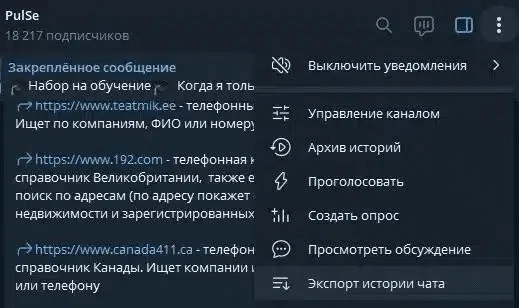
This method is best suited for cases where you need to download not only text messages, but also images, videos, and other types of content.
Second option.. This involves using TG collector… In this case, it is not possible to download images and videos, but you can export a batch of channels or chats at once, which can save a significant amount of time. If an image or video is needed from a chat, a link is provided, so you can simply open Telegram and retrieve it there.
To authorize TG collector, you will need a Telegram API key. To obtain it, go to my.telegram.org and log in using your phone number.It is strongly recommended to use a separate account for this purpose, ideally one that you do not mind using for experimental or OSINT-related tasks. In general, maintaining separate accounts for such activities is a good practice. Next, create a new application by entering any placeholder details, and then obtain your API ID and API Hash.
Now we can move on to exporting channels. First, we create a new collection (1), then add links to the channels or chats we need (2), which will appear in the list. After adding them, we select (3) the ones we want to export and click (4) “Collect messages.” Then we just need to wait a bit, depending on how many items we added and how much data they contain.
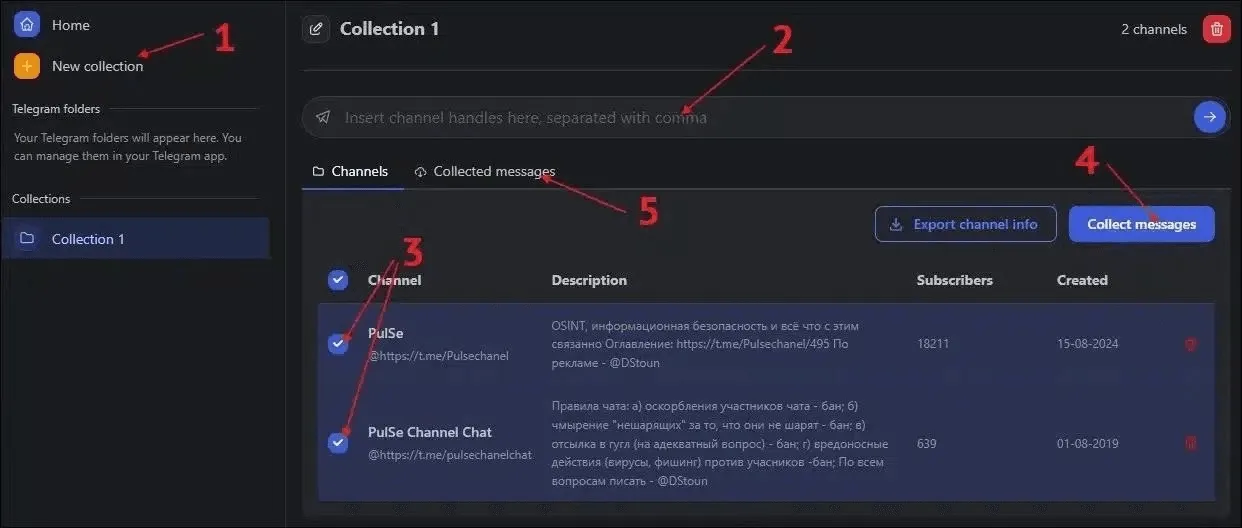
Once everything has been exported, we can go to the “Collected messages” tab (5). There, after selecting either JSON or CSV as the format, we can download the data.
Analyzing exported data. Google Pinpoint
We have downloaded the data and stored it for further use. However, to actually make it useful, it still needs to be analyzed in line with our goals and objectives. Of course, this could be done manually, but in that case, exporting it would not make much sense. Instead, we will take a more efficient approach and use Google Pinpoint. It is a highly effective tool for this type of analysis.
In Pinpoint, we need to create a new collection and upload our files into it. You can simply drag and drop an entire folder, and the system will automatically organize everything. After that, depending on the volume of data, we will need to wait while the analysis is processed. Once it is complete, we can start working with the content.
A major advantage of Pinpoint is its flexibility. It supports documents, images, and videos. If there is any text content, it will detect and extract it. For videos, it can also generate transcripts of the audio. In addition, Pinpoint automatically identifies mentions in all cases, including people, organizations, and locations. These are displayed in the panel on the right. Any of these entities, or their combinations, can be used as filters. There is also an option to filter by date.
Standard filters are useful, but they are never enough on their own. That is why manual search is also available. It supports quotation marks for exact matches, a minus sign to exclude unwanted keywords, and the OR operator to combine queries. These search options can also be combined with Pinpoint’s built-in filters, such as entity mentions.
But that is not all. Since this is a Google product, it also includes built-in Gemini integration, which can assist with analysis. In some cases, quite significantly. For example, it can generate summaries, perform calculations, identify relevant mentions, and support various other analytical tasks depending on the need.
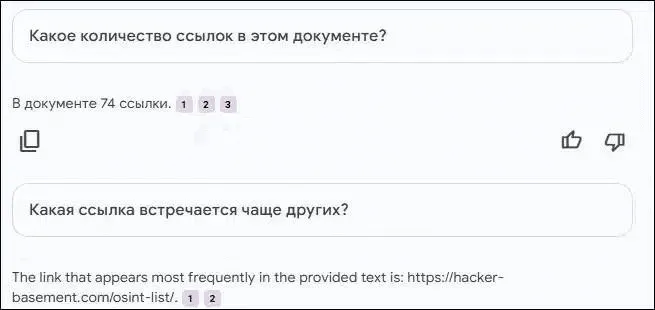
In addition, to make navigation easier, we can assign labels to documents and files. This involves defining a name for each label and selecting a color. These labels are visible in the overall file list and also appear in the filter panel. As a result, they can be used as filters to view only the documents marked with a specific label.
We can also open any file and highlight specific text fragments. On images, text can be selected in the same way as in regular documents. Once a fragment is highlighted, a link is automatically generated, which can be copied, or we can simply copy the selected text itself. Inside an open document, there is also a built-in search function, as well as the option to assign a label directly to the file.
Overall, the idea is fairly straightforward. The exact workflow depends on the specific goal, but in general Google Pinpoint can significantly save time and effort, making the analysis of channels or chats much more convenient and efficient.
Finally, there is one more tool that is situational, but can still be useful. If a chat administrator has not restricted access to the list of participants, it is possible to export that list. For this purpose, there is a dedicated bot available (link to the website in case the bot becomes unavailable):
https://pocketdetective-terms-and-conditions.mі.canva.site
https://t.me/PocketDetective_bot
Final thoughts
I believe that, based on the information provided, it should now be clearer how Telegram can be used to search for and gather the information you need. At the same time, it is important to understand that I have only outlined a set of methods and approaches that may produce results. However, the final outcome always depends on you and the actions you take in a specific situation.
It depends on which methods you choose, how you combine them, and, perhaps most importantly, how you analyze the information you obtain. Ultimately, these factors determine the results you will achieve.